

Publishing a Research Paper
| Overview | Identifying peer-reviewed journals | Journal Impact Factors |
| Obtaining Journal Impact Factors | Selecting journals in which to publish | Instructions to authors |
Overview
These steps indicate a method to follow in publishing your research paper in peer reviewed journals.
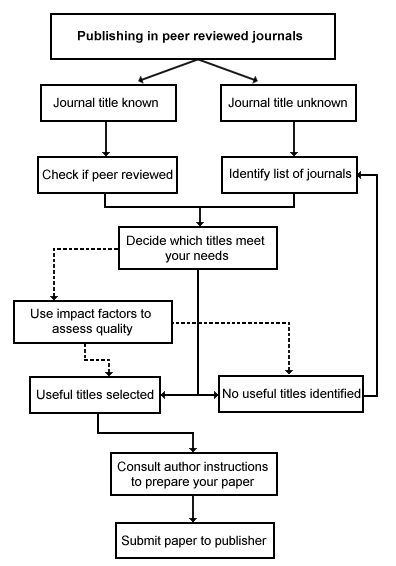
Identifying peer-reviewed journals
Peer-reviewed journals are an important medium for reported research output from universities. A definition of a peer review is:
The process by which a learned journal passes a paper received for publication to outside experts for their comments on its suitability and worth ¹
Publishing your work in a peer reviewed journal is an indication of quality. Intending researchers at UC need to submit their articles for review by experts in the field before the article can be approved for publication in a peer-reviewed journal. Many databases allow you to restrict your search to peer-reviewed journals. Journals indexed in Web of Knowledge are all peer-reviewed. To check if a journal is peer-reviewed you can search for it in Ulrich's Periodicals Directory or refer to the ISI Master Journal List
Articles to be included in the University of Canberra's report for the Higher Education Research Data Collection, which determines allocations to universities under performance based funding schemes, must be published in peer reviewed journals.
1 Peer review. (1989). In Oxford English Dictionary (vol. XI, p. 437). Oxford: Clarendon Press.
Journal Impact Factors
Looking at the impact factor of a journal is a further way of measuring its quality.
The journal impact factor is the average number of times that articles published in a specific journal in the two previous years (e.g. 2000-2001) were cited in a particular year (i.e. 2002). The calculation is determined as follows
| A = total cites in 2002 |
| B = 2002 cites to articles published in 2000-01 (this is a subset of A) |
| C = number of articles published in 2000-01 |
| D = B/C = 2002 impact factor |
There are variations between disciplines. One should view journals in the context of their specific field. Refer to the section Variations Between Disciplines in the article The Impact Factor. Some disciplines work on a five year impact factor.
Journal impact factors should not be used solely to evaluate journals. Other criteria should also be considered, such as peer review and scope.
Obtaining Journal Impact Factors
You can consult ISI Journal Citation Reports on the Web (JCR Web) to find the Impact Factor for a single journal title or a range of titles in a subject category. JCR Web draws citation data from over 7,000 scholarly journals worldwide in the sciences and social sciences.
JCR Web also depicts the Impact Factors of a journal over the last five years in the Impact Factor Trend Graph. Another feature is the Immediacy Index which measures how quickly the average article from a journal is cited within the year of publication. This number is useful for evaluating journals that publish cutting-edge research.
JCR Web is available via Web of Knowledge and is linked to Web of Science searches.
Selecting journals in which to publish
Once you have identified likely journals, check the aims and scope of each to determine whether your work is suitable for that journal.
- Does the journal focus on primary research or review articles?
- Does it publish qualitative or quantitative research methods?
- What are the principal fields covered by the journal?
If your work meets the aims and scope of the journal you have selected, submit your manuscript in the appropriate format for the journal. This format is usually indicated under "instructions to authors".
Excellence for Research in Australia (ERA), an Australian government initiative, is encouraging researchers to publish in the best journals. Journal lists are being prepared progressively in 8 clusters.
Instructions to authors
Instructions to authors (also called advice to authors or authors guide) detail what is and isn't acceptable to a particular publisher. Generally these guidelines include layout, referencing style, how to submit, submitting tables and figures in text, the audience, review process and publication.
You can find instructions to authors:
- in the print journal
- on the journal home page. For example from the Journal of Community Psychology or from The Internet and higher Education
- by writing to the editor or publisher of the journal. Email addresses and websites can by found from Ulrich's Periodicals Directory
If you use EndNote, you can often see how a particular journal requires contributions to be set out. Under Tools, select Manuscript Templates, then open the Templates folder. In EndNote 6 there are 145 journal titles. If yours is there, clicking on it will provide a full template for a word document including everything you need to submit a contribution to that journal.
Failing that, you may still see how other journals require their citations to be set out. Under Edit, click on Output Styles / Open Style Manager. Select the journal abbreviation from the list of 694 titles (in EndNote 6) then use that as your output style for a dummy document and select any item in your EndNote library to display it in the style required for the selected journal.
Help
For help using Web of Knowledge and JCR Web contact Louise.Cooper x5280.
For information on the University's grant schemes and applications: University of Canberra Research Office
Flowchart reproduced with permission from authors of UNISA website
Content Responsibility: Louise.Cooper@canberra.edu.au